Burst-aware selection
Groups similar photos and surfaces the strongest candidates so you can spend less time comparing near-duplicates.
Desktop culling for bird photographers
BirdCull helps photographers finish the first pass of bird photo selection. It analyzes burst sequences, highlights stronger shots, and exports practical folders or XMP star ratings for editing tools.
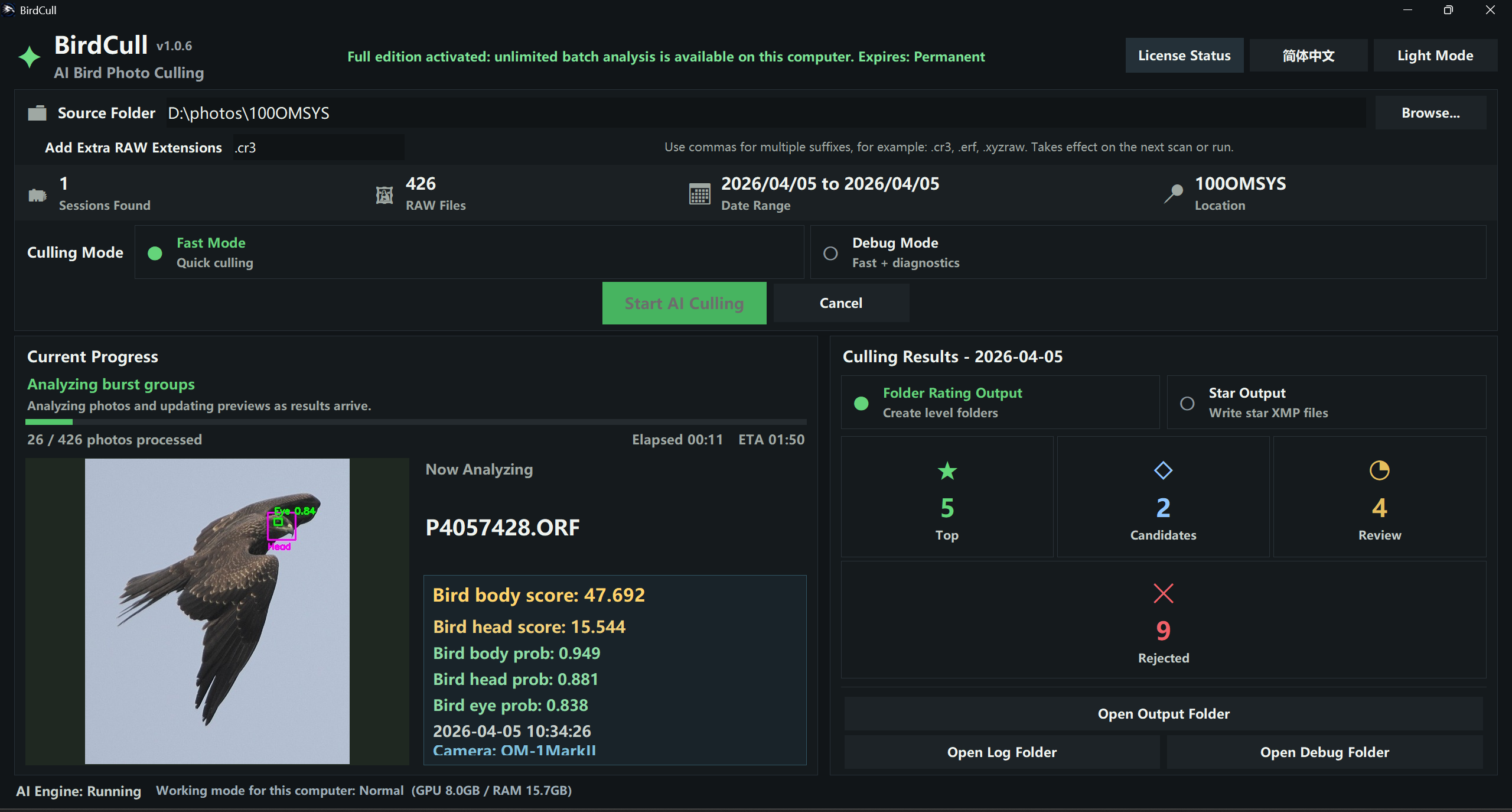
BirdCull focuses on the practical parts of culling: repeated bursts, similar frames, eye and head visibility, sharpness, pose, and quick handoff into your normal editing workflow.
Groups similar photos and surfaces the strongest candidates so you can spend less time comparing near-duplicates.
Considers head, eye, sharpness, pose, and within-burst differences instead of treating every image like a generic photo.
Exports grouped hard-link folders or star-rated XMP sidecars for Lightroom, Bridge, Photo Mechanic, and similar tools.
BirdCull is designed for local photo processing on modern Windows PCs and Apple silicon Macs.
Install BirdCull, choose your photo folder, select a date range and output mode, then review the generated results.
Load RAW or image folders from a local drive or external drive. NTFS is recommended for hard-link output.
BirdCull analyzes the selected date range and ranks results into practical review levels.
Open the output folders or import XMP star ratings into your post-processing application.
The same installer starts in trial mode. Activating a full license unlocks larger batches without reinstalling the app.
BirdCull licenses are delivered digitally. After purchase, follow the activation instructions in the app or contact support with your Paddle receipt and BirdCull device code.
Because BirdCull provides a free trial before purchase, completed license purchases are non-refundable. Please test the trial version on your computer before buying. Read the refund policy.
Email: glamecke@gmail.com
Developer: BirdCull
Windows 10 or Windows 11 64-bit, or Apple silicon Mac. NVIDIA RTX/GTX, AMD graphics, and CPU fallback are supported where available. 16 GB RAM, SSD storage, and local photo folders are recommended.
Supported storage formats: NTFS is recommended on Windows because BirdCull uses hard links for output. APFS is recommended on Mac. exFAT external drives may be readable, but some output modes may require copying the photos to an NTFS or APFS local drive first.
A BirdCull license is for using the desktop app. Do not redistribute installers, license keys, activation files, or reverse engineer protected components. Do not change system time, tamper with license data, or bypass activation to use the software. Read the full terms.